
Connect your account
Link the game to your account on the site with a six-letter code. It is used for the ranking, the secret words and progress on several devices.
The account is the same one as on the site [21millionstories.tv](https://www.21millionstories.tv). You can play without it; connected, you get:
- your name in the online ranking;
- your secret words kept, along with the heroes they unlock;
- the same progress on all your devices.
How to connect
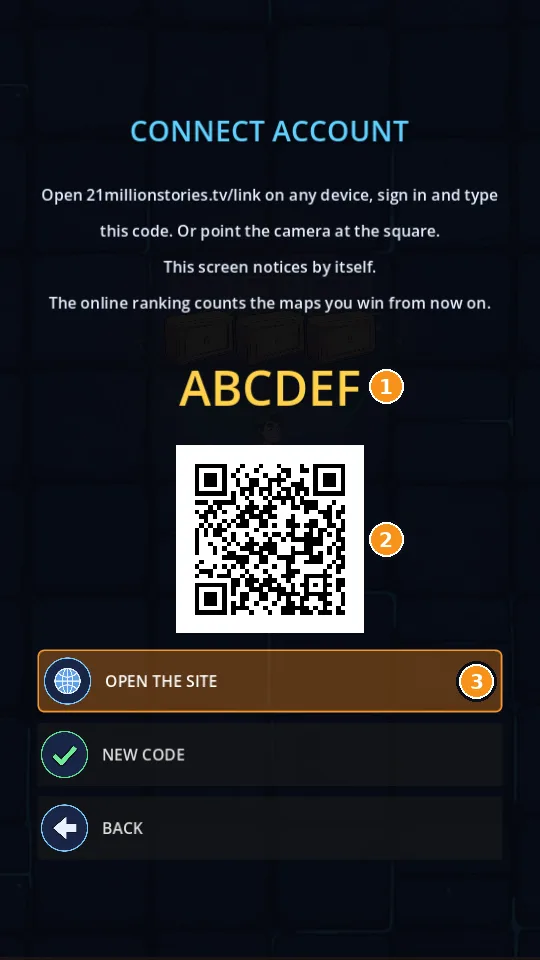
1 the six-letter code · 2 the QR code to open on your phone · 3 open the site
- In the game, go to SETTINGS → CONNECT ACCOUNT.
- The game shows a six-letter code and a QR code.
- Open the site: tap the button, point your camera at the QR code or type the address shown.
- On the site, sign in to your account (or create one) and confirm the code.
- Go back to the game. In a few seconds it connects on its own.
The code is good for ten minutes. If you leave the screen or the game reloads in the meantime, it keeps waiting; when you reopen CONNECT ACCOUNT, the code is the same. After that time, ask for another.
You never type a password in the game. The password stays on the site only.
How to tell you are connected
- At the bottom of the menu the green seal Connected: your nickname appears. Without an account, the same place shows an orange notice with the CONNECT button.
- In SETTINGS, the button now shows ACCOUNT: and your nickname.
- In MY RECORDS, the first line shows the account and the time your progress was merged.
Disconnecting
- In the game: SETTINGS → account → DISCONNECT THIS DEVICE. Your progress stays on the device; it just stops going to the account.
- On the site: My account lists the connected devices, and you can remove any of them. The game notices the next time it talks to the site and tells you on screen.
Each device (and each browser) is connected once. See Progress on several devices.
Updated on 2026-11-15