
Controls: moving, attacking and using the beam
Drag your finger to move. The hero attacks on its own when it gets close. The green beam in front of it dissolves what is fake.
Next Block is played with one finger. On a computer, use the mouse the same way, the keyboard, or a game controller (see the end of this page).
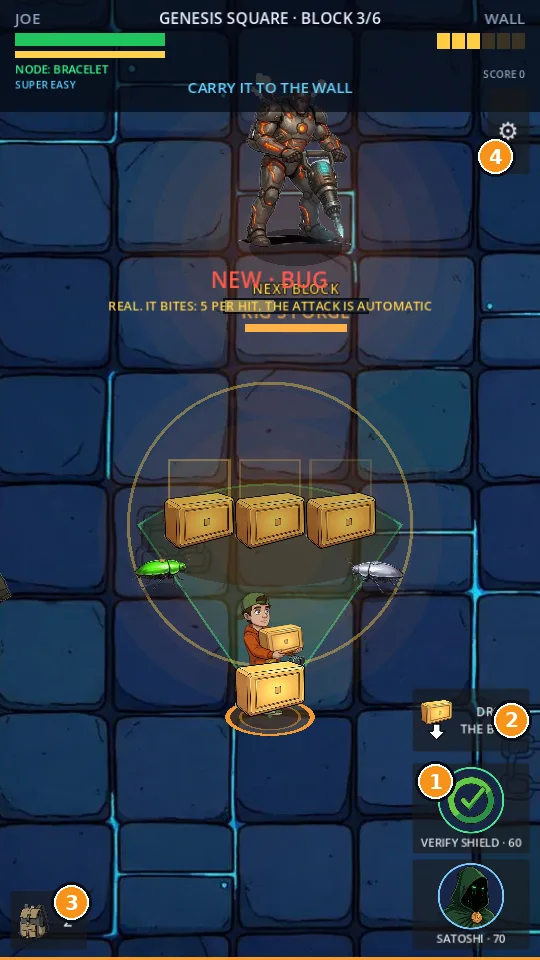
1 the two spells · 2 drop the block · 3 backpack · 4 settings
Moving
Drag your finger anywhere on the screen. The hero walks in the direction of the drag. There is no fixed direction pad: start the drag wherever is most comfortable.
Attacking
You don't press anything to attack. Get close to an enemy and the hero attacks on its own. Each hero attacks in its own way (up close, from a distance, in an area); it is written on the hero's card. See The heroes.
While carrying a golden block, the hero does not attack and walks slowly.
The green beam
In front of the hero there is a green beam, shaped like a cone. It does not hurt real enemies; it is there to verify: everything fake that stays inside the beam for a moment turns to dust. To aim the beam, walk toward the target.
It is the most important tool in the game. See What is real and what is fake.
The buttons
- Spells (bottom right corner): the two round buttons. Each one costs energy.
- Drop the block: appears above the spells when you are carrying a block. Two quick taps on the screen do the same.
- Backpack (bottom left corner): the spells you have earned and are not using, and your looks.
- Settings (top right corner): volumes, language and leaving the match. Opening the settings pauses the game.
Keyboard
- W A S D or the arrow keys: move.
- Space: first spell · Shift or E: second spell.
- F: drop the block · Q: backpack.
Game controller
Connect the controller to the computer or phone (by cable or Bluetooth) and, with the game open, press any of its buttons. There is nothing to turn on: the game picks it up by itself. If it does not respond, reload the page with the controller already connected and press a button again.
| During a match | Button |
|---|---|
| Move | left stick or D-pad |
| First spell · second spell | A · B |
| Drop the block | X |
| Backpack | Y |
| Red button in the left corner: SELL ALL (Paper Hands) and LEVERAGE (The Greed Algorithm) | RB (also LB, RT or LT) |
| Settings | Start (☰) |
The letters show up on the on-screen buttons while the controller is in use.
On the game's screens, an orange frame shows the selected button: the D-pad or the stick move the selection, A presses and B goes back. LB and RB flip through the map and scene cards and move the volume bars. A, B or Start skip a video. Touching the screen or clicking with the mouse hides the frame; a controller button brings it back.
Button names follow an Xbox-style controller; on other controllers, use the button in the same place. To type (secret words, room code) you still need the on-screen or computer keyboard.
Updated on 2026-11-20