
Unlocked scenes
Short scenes from the series, narrated by Hash, that you unlock by winning maps. They are kept in a gallery.
The game brings more than 30 short scenes from the series, narrated by Hash and subtitled in your language.
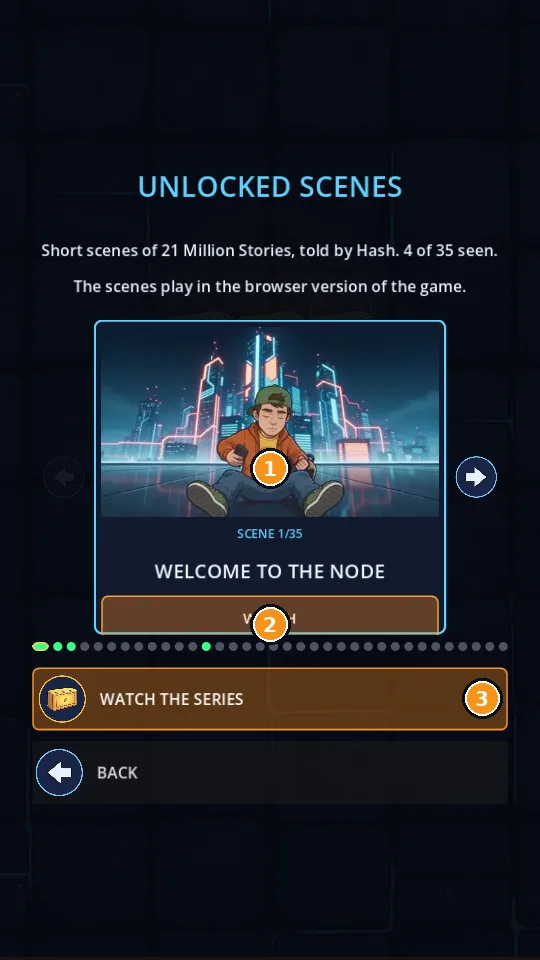
1 the scene card: tap to watch · 2 the dots: green is an unlocked scene, gray is a locked one · 3 watch the series
How to unlock
- By winning a map: after the boss, before the summary, a scene plays, drawn from the ones you have not seen yet.
- By entering a map for the first time: some maps open with a scene of their own.
In a room, each player sees their own scene after the boss.
The gallery
Under MY COLLECTION → UNLOCKED SCENES the game shows how many you have, one card at a time. Move sideways with the arrows or by swiping. Tapping the card of an unlocked scene starts it at once; a locked one shows a padlock and no picture. The WATCH THE SERIES button takes you to the full episodes.
During the scene
- SKIP appears in the top right corner after a few seconds. A skipped scene counts as unlocked.
- The volume of the scenes is the VIDEOS control, in the settings.
- If the screen shows a ▶, tap it: some browsers only let a video start with a tap.
Where they work
Scenes play in the browser version and need internet. With your account connected, your unlocked scenes go with you to all your devices.
The scenes are short clips; they do not tell the whole episode or show secret words.
Updated on 2026-11-20