
Play together: creating and joining a room
Up to four people in the same match, each on their own device. One creates the room and shares the four-letter code.
PLAY TOGETHER, in the menu, puts up to four people in the same match, each on their own phone or computer, anywhere. Everyone needs internet.
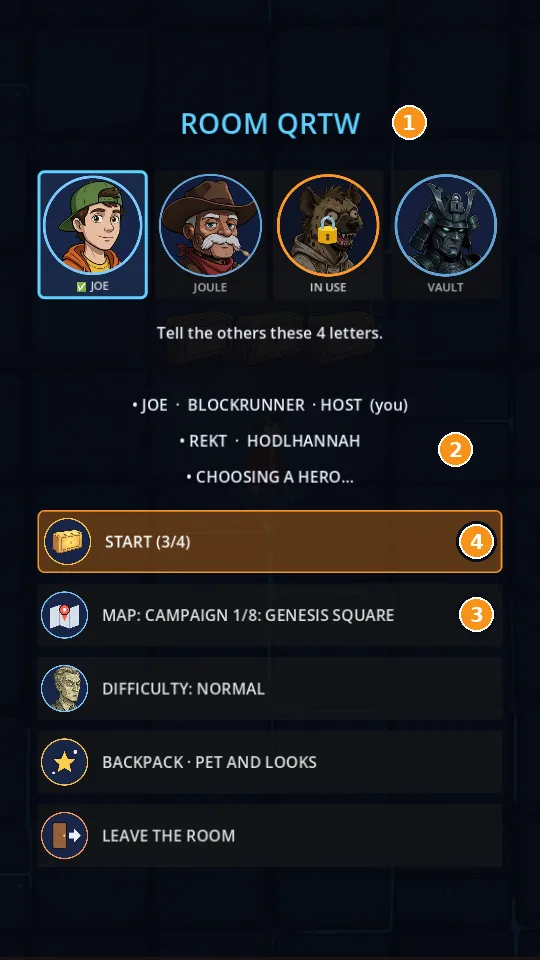
1 the room code · 2 who has joined and with which hero · 3 map and difficulty (only the host changes them) · 4 start
Creating a room
- Tap PLAY TOGETHER, then CREATE A ROOM.
- The game shows a four-letter code. Share it with your friends.
- You are the host of the room: you choose the map and the difficulty.
- When everyone is in, tap start. There is a 3, 2, 1 countdown.
Joining a room
- Tap PLAY TOGETHER, then join a room.
- Type the code on the game's own keyboard.
- Choose your hero.
Heroes
Each player picks a different hero. Whoever arrives later chooses among the ones left. See The heroes.
After the match
The room stays open. Guests see the summary and wait for the host, who can pick another map and start again with the same people. To leave, tap LEAVE THE ROOM.
Languages
Each player sees the messages in their own language, even if the others play in another.
Play together works in the browser. See Where to play.
Updated on 2026-11-15