
Language, sound and settings
Volumes, language, account and how to leave a match. Settings open from the menu or from the gear during a match.
SETTINGS is at the end of the menu. During a match, tap the gear in the top right corner: the game pauses while the screen is open.
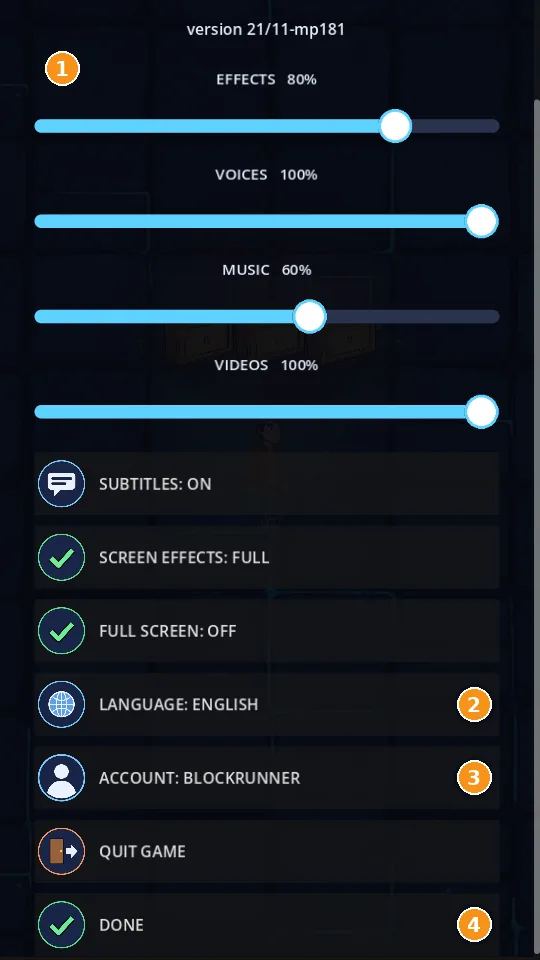
1 volumes · 2 language · 3 account · 4 done
Volumes
Four separate controls: music, effects, voices and videos (the scenes from the series and the how-to-play video).
Language
The game comes in 15 languages: English, Portuguese, Spanish, French, German, Italian, Russian, Turkish, Arabic, Chinese, Japanese, Korean, Hindi, Indonesian and Vietnamese. Changing the language changes the texts, the subtitles, the character voices, the scene narration and the HOW TO PLAY video. Character and map names stay in English in every language.
Each language's voices are downloaded only by whoever plays in it, the first time. The change applies right away and the game goes back to the menu. You can only change language from the menu, not in the middle of a match.
Secret words are always typed in English, as they appear in the episode.
Account
CONNECT ACCOUNT links this device to your account on the site, for the ranking, the secret words and progress on several devices. Once connected, the button shows your nickname. See Connect your account.
Screen effects
SCREEN EFFECTS switches between FULL and REDUCED. The effects are the flash, the screen shake, the freeze, the glitch and the short slow motion that show up at big moments. On REDUCED they are much lighter; the game is the same. It helps if motion makes you feel sick or your device is on the slow side.
Leaving a match
From the gear, during a match, QUIT TO THE MENU asks you to confirm: the match ends there and the points for that map are lost. In a room, whoever quits leaves the team; the others keep playing.
News
When the series team publishes a message, it opens on its own over the menu, one at a time, with the title NEW MESSAGE. Only messages from the last few days open like this; older ones stay in the inbox.
- OK, I READ IT marks the message as read: it will not open again.
- ALL MESSAGES opens the inbox with every message.
- Some messages have a button of their own that takes you straight to what they talk about (a ranking, the secret words, a page on the site).
The envelope in the top corner of the menu opens the inbox at any time and pulses while there is an unread message. Other than that, the game does not send notifications on its own.
Updated on 2026-11-20